Saw something on Amazon that doesn't ship to Colombia, or that costs twice as much here? Learning how to buy on Amazon from Colombia is easier than you think, and in this guide we'll walk you through everything, step by step, like a friend who already does it every month. The key is having a US address (free), a way to pay even without an international card, and someone to bring the package right to your door.
By the end you'll be able to make your first purchase with confidence: no surprises at checkout, no headaches at customs, and no overpaying for shipping.
Why it's worth buying on Amazon from Colombia
Shopping on Amazon US unlocks a huge catalog that often doesn't exist locally, and at noticeably better prices. The clearest advantages:
- Massive variety: millions of products, brands and models you can't get here or that arrive late.
- Better prices: many items cost less in dollars than the local equivalent, even after shipping and taxes.
- Constant deals: Prime Day, Black Friday and Cyber Monday with real discounts.
- Trustworthy reviews: thousands of real opinions help you choose better before buying.
- Latest releases first: tech, clothing and gadgets reach the US months before Colombia.
The only catch is that Amazon doesn't ship every product directly to Colombia. But that has a fix, and it's exactly what you'll learn here.
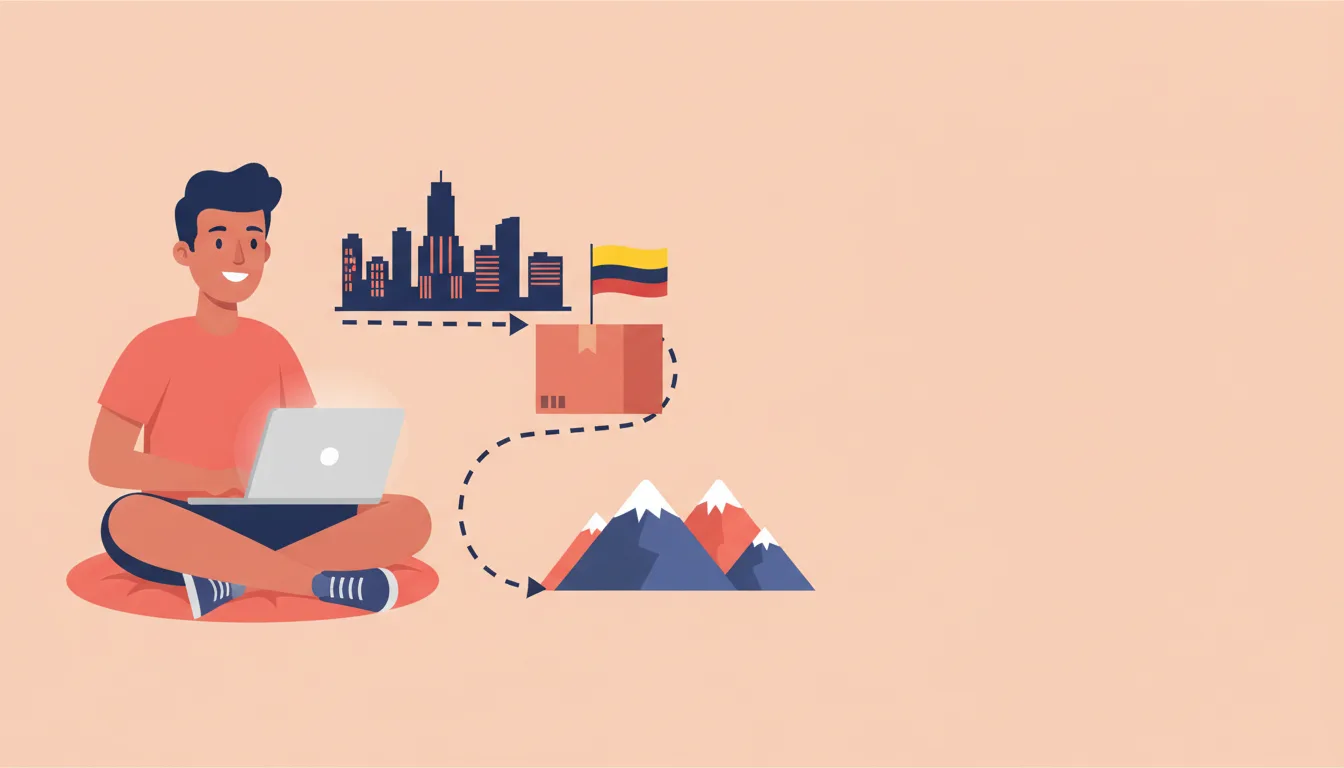
What you need before you start
Before diving into Amazon, make sure you have these three things sorted. They're the foundation of everything, and once they're clear, the rest is a breeze.
1. A US address
Amazon needs a shipping address inside the US for many of its products. The easiest and cheapest way to get one is a virtual mailbox: a real Miami address that's yours, where Amazon delivers as if you were a local customer. With PrimeBox, opening one is free and you get your Miami address instantly. To understand the concept in depth, read what is a virtual mailbox.
2. A payment method Amazon accepts
Here's the most common question: "do I need an international card?". The short answer is not necessarily. Below we explain three ways to pay, even if you only have a Colombian card or prefer to pay in pesos.
3. A way to bring the package to Colombia
Once the product arrives at your Miami address, someone has to forward it to Colombia and handle customs. That's the part PrimeBox does for you: we receive, inspect, declare it correctly and ship it to your city.
With those three covered, you're ready to shop. Let's go step by step.
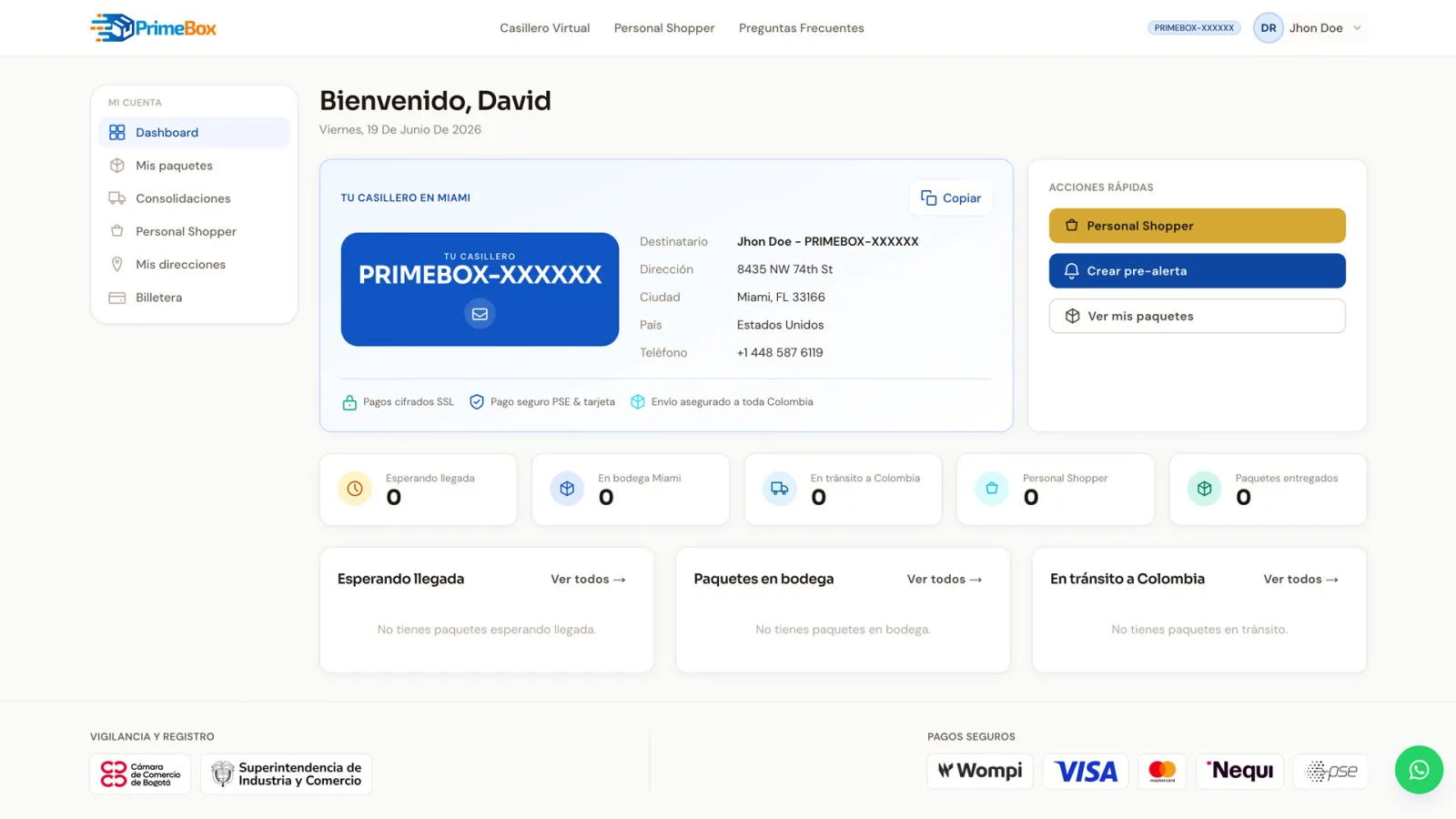
Step 1: Create your Miami address (free with PrimeBox)
First, get your US address. Without it, many Amazon products simply won't let you complete the purchase.
- Activate your free virtual mailbox in Colombia with PrimeBox.
- Fill in your basic details. Opening is free and the Miami address is generated instantly.
- You'll get an address in this format: a Miami street and number plus your personal code PRIMEBOX-XXXXXX. That code is how we identify the package as yours when it reaches the warehouse.
Important: whenever you shop, use your full address with the PRIMEBOX-XXXXXX code on the address line. If you forget it, the package may arrive without us knowing whose it is.
Step 2: Create your Amazon US account
To shop the US catalog you need to be on the right store and create (or adjust) your account.
- Go to https://www.amazon.com. Make sure it's the .com domain (United States), not another country's Amazon.
- Click "Hello, sign in → Create your Amazon account" and register with your email.
- Under "Your Addresses", add your PrimeBox Miami address exactly as we gave it to you, without forgetting the PRIMEBOX-XXXXXX code.
- If the page shows in another language or currency, switch it to English and US dollars (USD) from settings to avoid pricing confusion.
Tip: some products only appear available for shipping within the US once you have a US address saved. That's why it's worth adding your Miami address before you start browsing.
Step 3: How to pay on Amazon without an international card
This is the part that holds most people back, so let's take it slowly. You have three paths depending on what you have on hand.
Option A: Personal Shopper (pay in pesos, 8% commission)
This is the most convenient option if you don't have an international card or simply want to pay in Colombian pesos with no hassle. It works like this:
- You send us the link to the Amazon product you want.
- We send you a quote (usually within about 24 hours) with the product price, our 8% commission and the estimated shipping and taxes.
- You pay in Colombian pesos with Nequi, PSE or a local card through Wompi. We use the live exchange rate (TRM) from Banco de la República, so the conversion is fair and transparent.
- We make the purchase for you on Amazon using our US payment methods, and the product arrives at the Miami warehouse ready to ship to Colombia.
This way you need no international card and no dollars: you pay everything in one place, in pesos. Learn more about the Personal Shopper service.
Option B: Virtual cards
Some Colombian banks and fintech apps offer virtual cards that allow international purchases. If your bank offers one, you can:
- Generate the virtual card from your bank's app.
- Load it with a dollar balance (or let the bank convert automatically).
- Use those details as a payment method on Amazon.
In Colombia, fintechs and banks such as Nu, RappiPay, Lulo Bank, Nequi or the digital cards from Bancolombia and Davivienda offer virtual cards, and several work for international purchases. Before using one on Amazon, confirm with the provider that international purchases are enabled and check the fees: availability and terms change often, and some virtual cards are declined by Amazon or add a foreign-purchase surcharge.
Option C: Ask someone in the United States
If you have family or a friend in the US, you can ask them to make the purchase with their card and send it to your Miami address (or directly to your mailbox). You pay them back however you agree. It's handy for one-off purchases, though it depends on that person's availability.
Our recommendation: for most people, Option A (Personal Shopper) is the simplest because it solves payment and shipping in one step, all in pesos.
Step 4: Search for and choose your products
With an account and payment method ready, here comes the fun part: shopping.
- Search by name or category in Amazon's top bar.
- Filter by "Ships to" or availability: make sure the product can ship to your Miami address. If it says it doesn't ship there, look for another seller of the same product.
- Prefer "Sold by Amazon" items or sellers with good reputation and lots of reviews.
- Read the reviews and look at buyer photos: they save you from surprises with sizes, colors or quality.
- Check the weight and dimensions in the "Product information" section. This matters because the shipping cost to Colombia depends on weight.
Money-saving tip: since shipping is charged by weight, it's sometimes better to group several small purchases into one shipment instead of sending them separately.
Step 5: Complete the purchase
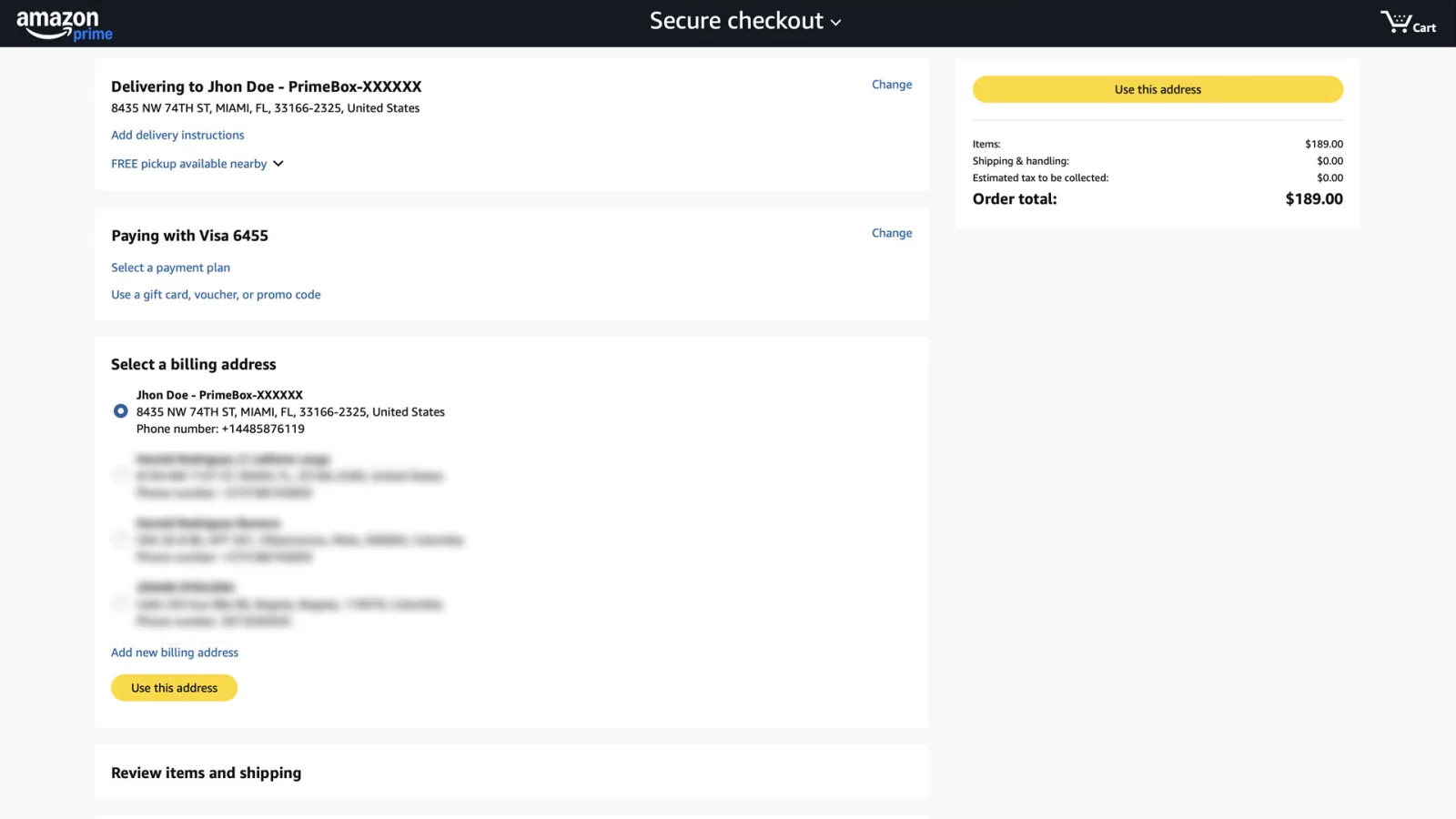
When your product is in the cart:
- Go to "Proceed to checkout".
- Confirm the shipping address: it must be your Miami address with the PRIMEBOX-XXXXXX code. This is the most common mistake, so double-check it.
- Choose the US shipping method. Standard FREE Shipping is usually enough; don't pay for express shipping within the US unless you're in a hurry.
- Select your payment method (your card, a virtual card or, if you use Personal Shopper, we handle this step).
- Review the total and place the order.
Save the order number and the confirmation email. If you use PrimeBox, you can let us know a package is on the way so we identify it faster on arrival.
Step 6: Shipping to Colombia (3 to 8 business days)
When Amazon delivers your product to the Miami address, the PrimeBox part begins:
- We receive your package at the Miami warehouse and link it to your account via the PRIMEBOX-XXXXXX code.
- We inspect and log it: we verify the contents and the real weight.
- We ship it to Colombia. Typical transit is 3 to 8 business days once processed.
- We handle customs and the correct declaration so it arrives without trouble.
On shipping cost, the PrimeBox rate is tiered by weight:
| Package weight | Reference rate |
|---|---|
| 1 pound | US$8.00 (minimum rate) |
| 10 to 55 pounds | approx. US$3.00 per pound |
| 56 pounds or more | from US$2.80 per pound |
These rates are for reference. For the exact cost of your purchase (shipping + taxes), use our calculator before you pay so there are no surprises.
Remember that besides shipping, import taxes (duty and VAT) may apply depending on the product and value. We explain it all in our guide on US-Colombia import taxes. And since you pay in pesos, it helps to understand what the TRM is to know how the conversion works.
Step 7: Receive your purchase at home
The last part is the most satisfying: your order arrives in your city in Colombia. With PrimeBox:
- We notify you when the package leaves Miami and when it's out for delivery in Colombia.
- You track your shipment status from your account.
- You receive at the address you registered, with no need to go pick anything up.
And a reassuring fact: your shipments are insured up to US$2,000 USD, and PrimeBox is supervised by the SIC and registered with the Bogotá Chamber of Commerce. More than 1,200 customers already shop this way, with a 4.9★ rating.
What about Amazon's own international shipping ("Amazon Global")?
You might wonder: "why not just let Amazon ship it straight to Colombia?". For some products Amazon offers its own international shipping (Amazon Global), but it has downsides compared to a mailbox:
- Limited catalog: most products, especially from third-party sellers, are not available for direct shipping to Colombia.
- Inflated import costs: Amazon often charges an upfront "import deposit" that can be higher than the real taxes.
- Less control: you can't group several purchases into one shipment to save on weight.
That's why, for most purchases, using a Miami mailbox is cheaper and gives you more options. You decide how to group, when to ship, and you pay the real shipping cost by weight, not an inflated estimate.
Tips to save on every purchase
Shopping smart is the difference between an expensive buy and a great deal:
- Group small purchases: since shipping is charged by weight and the first pound has a US$8.00 minimum rate, combining several light products into one shipment lowers the cost per item.
- Use the discount seasons: Prime Day (July), Black Friday and Cyber Monday bring real markdowns. Build a wish list and wait for the deal.
- Compare the final price, not the store price: a cheaper but very heavy product can end up costing more once shipping is added. Use the calculator before deciding.
- Watch the TRM: since you pay in pesos, a day with a lower exchange rate works in your favor. Learn how it works in our guide on what the TRM is.
- Mind the volumetric weight: very large but light packages (like pillows) may be charged by volume. Compact, heavy products usually pay off better.
Common mistakes to avoid
Learn from others' slip-ups so your first purchase goes perfectly:
- Forgetting the PRIMEBOX-XXXXXX code in the address. Without it, the package arrives "orphaned" at the warehouse and takes longer to identify. Always check it.
- Buying on another country's Amazon by mistake. Confirm you're on amazon.com (US) and not another domain.
- Not checking whether the product ships to your Miami address. Some sellers don't deliver to mailboxes; find another seller of the same item.
- Under-declaring the value to pay less tax. It's illegal and can cause the package to be held and fined. Always declare the real value; you can confirm rules at the DIAN.
- Paying for express US shipping when you don't need it. Free standard shipping to Miami is usually enough.
- Not estimating costs before buying. Calculate shipping and taxes first to know the real final price, not just the store's.
Frequently asked questions
Can you buy on Amazon from Colombia?
Yes. Even though Amazon US doesn't ship every product directly to Colombia, you can use a Miami address (a virtual mailbox) to receive your purchases there and forward them to the country. You can also use a personal shopper service that buys for you and charges you in Colombian pesos.
Do I need an international credit card to buy on Amazon?
Not necessarily. If you don't have an international card, you can use the PrimeBox Personal Shopper service, which buys the product for you and charges you in Colombian pesos via Nequi, PSE or a local card. Virtual cards or asking someone in the US are also options.
How long does an Amazon shipment to Colombia take?
With PrimeBox, once your package reaches our Miami warehouse, shipping to Colombia usually takes 3 to 8 business days. Add to that the time Amazon needs to deliver the product to your Miami address.
How much does it cost to bring an Amazon purchase to Colombia?
The cost depends on the package weight. PrimeBox uses a tiered rate: 1 pound costs US$8.00 (minimum rate) and drops to from US$2.80 per pound on larger packages. Import taxes apply on top, based on the product and value. Estimate your case before you buy.
Do I have to pay taxes when buying on Amazon from Colombia?
Usually yes, except in some low-value cases. Duty and VAT apply depending on the product and the shipment value. Under the free trade agreement, purchases up to US$200 shipped from the United States enter duty-free, but the 19% VAT may still apply. Check our import taxes guide to estimate the total.
In short: your first Amazon purchase is one step away
Buying on Amazon from Colombia comes down to three things: a Miami address (free with PrimeBox), a way to pay (even without an international card, thanks to Personal Shopper in pesos) and someone to bring the package home in 3 to 8 business days. With this guide you now have the full map.
The first step is the easiest and costs nothing: open your mailbox. Create your free mailbox and get your Miami address instantly to start shopping on Amazon today.